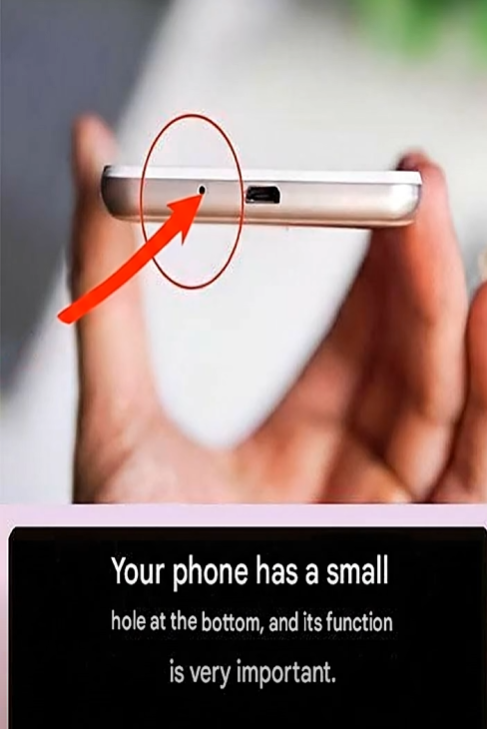
Take a close look at your smartphone.
Near the charging port, speaker grille, or bottom edge of the device, you’ll probably notice a tiny hole that many people rarely think about. It’s so small that it’s easy to overlook, yet it plays an important role in the way your phone functions every single day.
Over the years, countless smartphone users have wondered:
What exactly is that tiny hole for?
Some people assume it’s part of the speaker system.
Others think it’s a reset button.
A few even believe it’s designed to drain water or release heat from the device.
The truth is much simpler—and much more interesting.
That tiny opening is usually home to one of the most important components of your smartphone: a microphone.
Let’s explore what that small hole does, why it’s necessary, and a few fascinating facts most people never realize about modern smartphones.
A Tiny Feature With a Big Job
Although smartphones have become increasingly powerful over the years, many of their most important components remain surprisingly small.
The tiny hole found near the bottom of most phones is typically designed to allow sound to reach an internal microphone.
Whenever you:
- Make a phone call
- Record a voice message
- Use voice assistants
- Participate in video meetings
- Record videos with sound
- Use speech-to-text features
The microphone is working hard behind the scenes.
Without it, people on the other end of your call wouldn’t hear you clearly.
Voice commands wouldn’t function properly.
Video recordings would lose one of their most important elements: audio.
Why Is the Hole So Small?
Many people wonder why manufacturers don’t simply make the microphone opening larger.
The answer involves both protection and performance.
A small opening helps:
- Reduce dust entry
- Protect delicate internal components
- Maintain water resistance on certain devices
- Preserve sound quality
- Prevent accidental damage
Engineers carefully design the size and placement of these openings to balance durability and performance.
Even a tiny change can affect how sound enters the microphone.
Modern Smartphones Often Have Multiple Microphones
Here’s something many users don’t know:
Most smartphones don’t contain just one microphone.
Many modern devices include several microphones positioned around different parts of the phone.
You might find microphones located:
- At the bottom
- Near the top edge
- Beside the camera module
- Along the sides of the device
Each microphone may serve a specific purpose.
Some help capture your voice during calls.
Others assist with video recording.
Additional microphones may help reduce background noise.
The Science Behind Noise Cancellation
Have you ever taken a phone call in a busy environment and noticed that your voice still sounded clear?
That’s often thanks to multiple microphones working together.
Modern smartphones use sophisticated technology to distinguish your voice from surrounding sounds.
For example:
- Traffic noise
- Wind
- Conversations nearby
- Restaurant sounds
- Air conditioning systems
Additional microphones help the phone identify unwanted background noise and reduce its impact.
The result is often a clearer listening experience.
A Common Mistake Many People Make
Because the hole is so small, some people mistakenly believe it’s clogged when they don’t hear sound properly.
In reality, the tiny hole is usually not connected to the speaker at all.
The microphone and speaker are separate components.
Attempting to poke objects into the microphone opening can potentially damage delicate parts inside the phone.
This is why experts generally recommend avoiding sharp objects when cleaning smartphone openings.
How to Clean Around the Microphone Safely
Over time, dust and debris can accumulate around small openings.
If you believe your phone’s microphone area needs cleaning, consider gentle methods such as:
- Using a soft brush
- Using compressed air according to manufacturer guidelines
- Wiping the surrounding area with a clean microfiber cloth
Always consult your phone manufacturer’s recommendations before cleaning.
Using inappropriate tools may cause unintended damage.
Other Tiny Holes You May Notice
Smartphones often contain several small openings that serve different purposes.
These may include:
Speaker Openings
These allow sound to travel outward from the device.
SIM Card Tray Access Point
Many phones include a tiny hole used with a SIM eject tool.
Additional Microphones
Secondary microphones help with noise reduction and audio recording.
Pressure Equalization Components
Certain devices use specialized openings to help manage internal pressure.
Each opening has a carefully designed function.
Why Smartphone Design Matters
Modern smartphones are incredible examples of engineering.
Inside a device that fits comfortably in your hand are:
- Cameras
- Processors
- Batteries
- Sensors
- Antennas
- Speakers
- Microphones
- Wireless communication systems
Every millimeter of space matters.
Engineers spend years optimizing layouts to improve performance while keeping devices thin and lightweight.
Even something as small as a microphone opening requires significant design consideration.
Voice Technology Has Changed Dramatically
Years ago, mobile phones primarily handled voice calls.
Today’s smartphones do much more.
Microphones now support:
- Virtual assistants
- Voice search
- Language translation
- Accessibility features
- Video content creation
- Audio recording applications
- Voice notes
The tiny microphone opening helps power many of these everyday functions.
Without it, modern smartphone experiences would be very different.
Fun Facts About Smartphone Microphones
Your Phone Hears More Than You Realize
Advanced microphones can detect subtle sounds with impressive clarity.
Different Apps Use Microphones Differently
Video apps, voice assistants, and calling apps may process audio using different techniques.
Placement Affects Performance
Engineers carefully choose microphone locations to optimize sound capture.
Multiple Microphones Improve Quality
Using more than one microphone often helps create clearer recordings.
How to Know If Your Microphone Has a Problem
Although microphones are generally reliable, issues can occasionally occur.
Potential signs include:
- People having difficulty hearing you during calls
- Voice recordings sounding muffled
- Voice assistant commands not being recognized consistently
- Poor audio quality in videos
If problems occur, checking manufacturer support resources may help identify possible causes.
Protecting Your Smartphone
One of the best ways to preserve microphone performance is simply treating the device carefully.
Helpful habits include:
- Keeping the phone clean
- Using protective cases when appropriate
- Avoiding exposure to excessive dust
- Following manufacturer care instructions
- Avoiding inserting objects into small openings
Simple precautions can help keep devices functioning properly for years.
The Hidden Technology We Take for Granted
It’s interesting how often we use technology without fully understanding how it works.
Most people make calls, record videos, and send voice messages every day.
Yet few stop to think about the tiny microphone quietly making those activities possible.
That small hole near the bottom of your phone may not seem important.
But it serves as the gateway through which your voice enters a sophisticated communication system.
Without it, many of the features we rely on daily simply wouldn’t work.
Final Thoughts
The next time you notice the tiny hole at the bottom of your smartphone, you’ll know it’s much more than a random design detail.
In most cases, it’s an essential microphone opening that helps your phone capture sound for calls, recordings, voice commands, and much more.
Despite its small size, it performs an important job every day.
It’s a great reminder that some of the most useful features in modern technology aren’t always the most obvious ones.
Sometimes the smallest components are responsible for some of the biggest functions.